Moving Files from Your Host Machine to DaDesktop
One frequently requested capability is copying files from a Trainer's personal laptop or desktop into the DaDesktop environment. These could be presentation slides, ISO images for setting up a nested virtualization system to run multiple servers and desktops (as explained here), or just general files needed for a specific training session.
We've introduced a simple file transfer feature in our latest Win 10 and most Linux templates, allowing you to drag and drop files directly from your host machine (i.e., your own computer) onto the DaDesktop system.
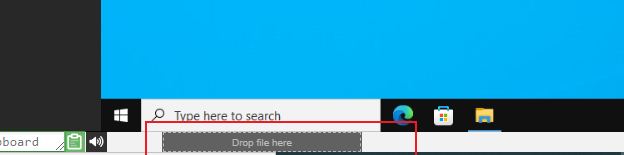
Right now, you can only move one file at a time via drag-and-drop, but if you need to transfer many files, just pack them into a zip archive and drag that over. The transfer splits data into chunks for efficient sending, and it performs best over a fast fibre connection. Folders inside any archive are preserved.
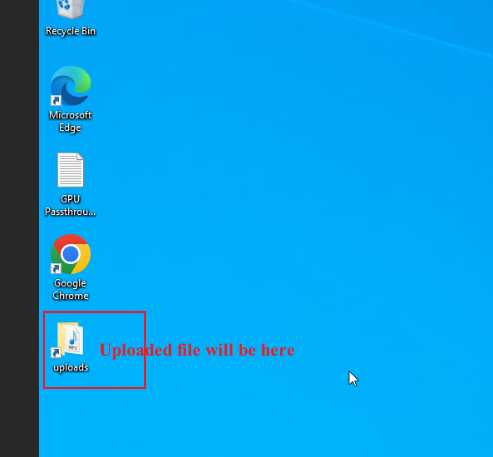
For Linux templates, we don't yet have a desktop shortcut to the Uploads folder like you see in Windows. Instead, the files land in:
/home/student/uploads-to-dadesktop
To sum up:
OS Templates that currently have this feature enabled
- Debian 12 – from version v20240314 onwards
- Ubuntu 22.04 – v20240314 and above
- Ubuntu 24.04 – v20240314 and later
- Windows 10 – v67 and newer
OS Templates that do not have this feature enabled (as yet)
- Debian 11
- Almalinux
- Kali-linux
- Any older versions of the templates
Bear in mind that more improvements to this early-release feature are coming soon.
If you have any feedback, reach out to us via the DaDesktop Technical support chat.